CodeDeploy, CodePipeline, S3 Bucket 설정 및 배포까지의 과정을 정리했다.
AWS 아키텍처
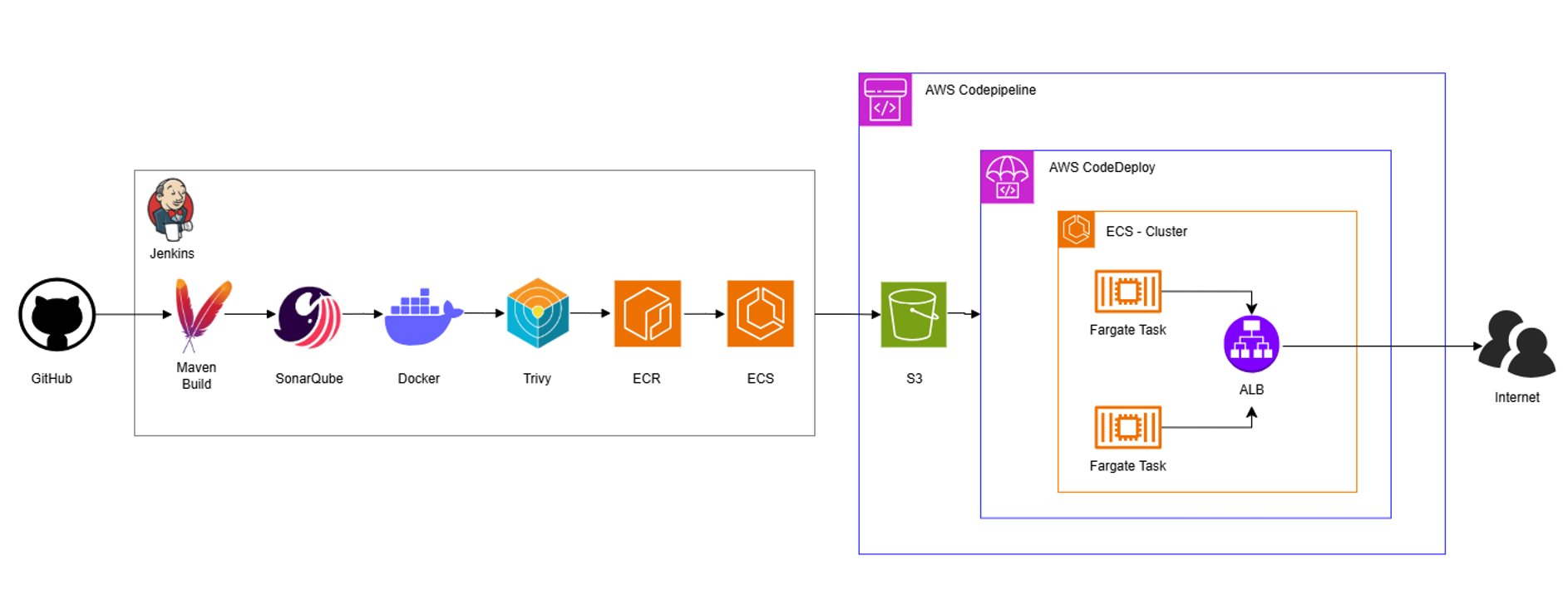
CodePipeline은 S3와 ECR에 저장된 최신 아티팩트를 소스로 파이프라인을 실행하며, 배포 단계에서는 CodeDeploy를 통해 ECS 클러스터에 Blue/Green 방식의 배포를 수행한다.
CodeDeploy 란?
CodeDeploy는 소스코드를 EC2, ECS, Lambda 등의 운영 환경에 자동 배포하는 역할을 수행하는 서비스이다.
배포 과정에서의 중단을 최소화하도록 롤링 배포나 Blue/Green 배포를 지원하며, 배포 전·후 훅(hook)을 통해 스크립트 실행과 검증을 수행 가능해 배포 실패 시 롤백을 지원한다.
CodeDeploy 생성
deployment-controller=CODE_DEPLOY 옵션은 콘솔에서 설정할 수 없기 때문에 CLI를 통해 ECS 서비스를 생성한다.
aws ecs create-service \
 --cluster Daegok-Cluster \
    --service-name Daegok-Cluster-Service \
    --task-definition Daegok-Petclinic-task \
    --desired-count 1 \
    --launch-type FARGATE \
    --deployment-controller type=CODE_DEPLOY \
    --network-configuration "awsvpcConfiguration={subnets=[<Public Subnet ID>,<Public Subnet ID>],securityGroups=[<Security Group ID>],assignPublicIp=DISABLED}" \
    --load-balancers targetGroupArn=<대상 그룹 ARN>,<대상 그룹 ARN>,containerName=<Container 이름>,containerPort=<Container 포트>
CodeDeploy 생성
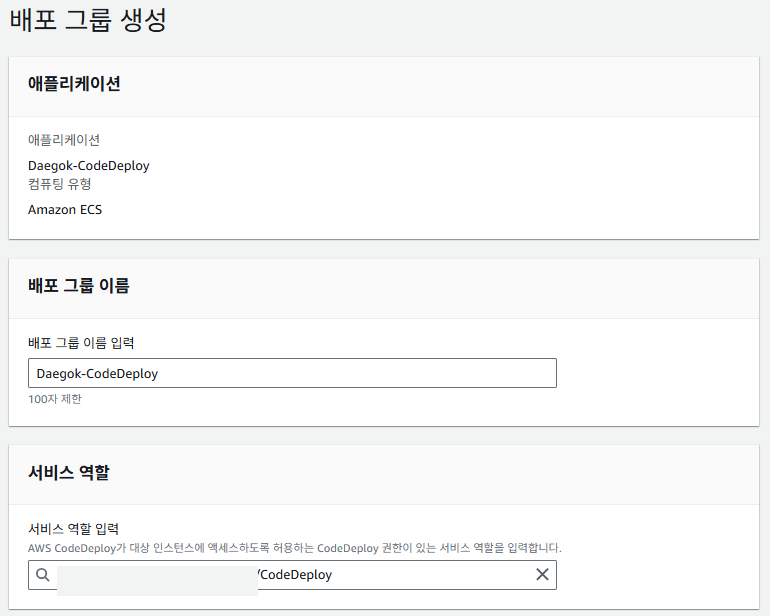
서비스 역할은 IAM에서 밑에 있는 권한 정책을 넣어줘야한다.
AWSCodeDeployRole, AWSCodeDeployRoleForECS

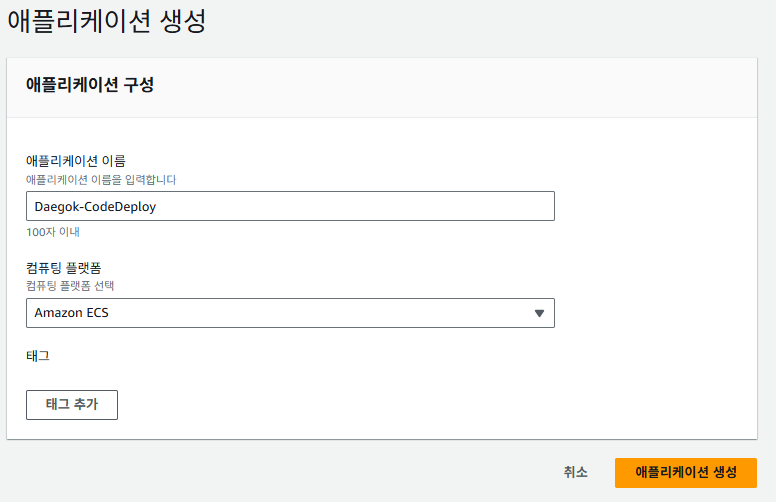
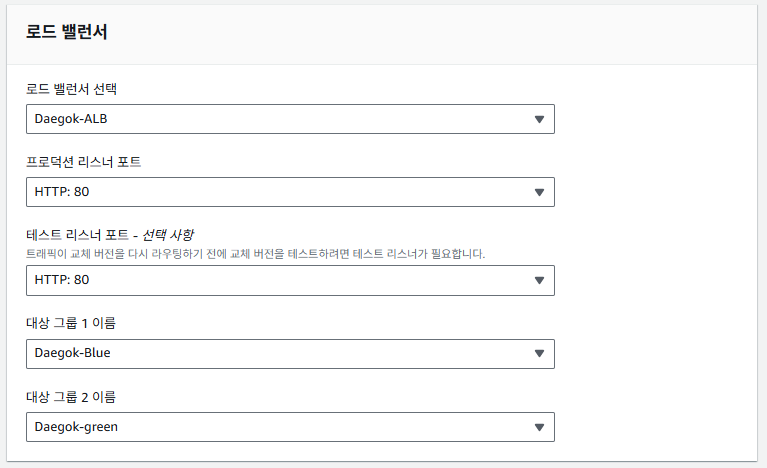
1. 배포 애플리케이션 생성
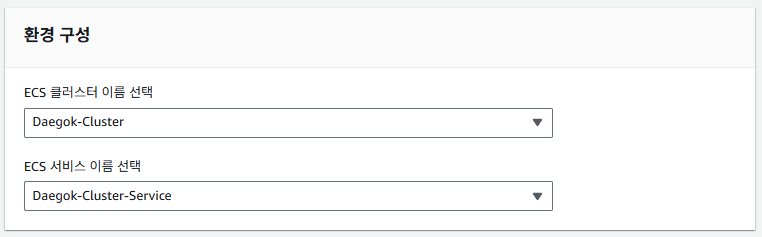
2. 배포 그룹 생성

S3(Amazon Simple Storage Service) 란?
S3은 웹 사이트, 객체 단위로 데이터를 저장하고 관리하는 스토리지 서비스이다.
데이터를 버킷에 저장하며, 저장 용량이 무한한 대용량 파일 저장소로서 정적 파일, 백업 데이터, 로그, 배포 아티팩트 증을 안정적으로 보관 가능하다.
S3 Bucket 생성


CodePipeline 란?
소스 코드 변경부터 빌드, 테스트, 배포까지의 과정을 하나의 파이프라인으로 자동화하는 CI/CD 서비스이다.
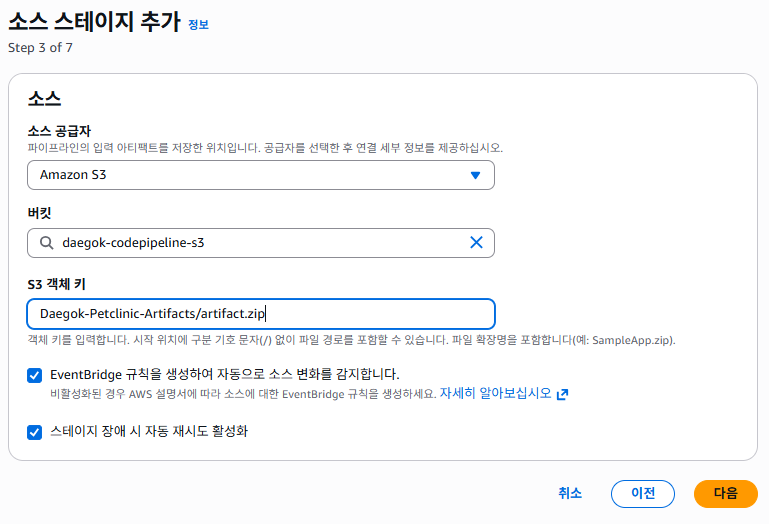
GitHub나 S3, ECR 등의 변경을 감지해 파이프라인을 실행하며, CodeBuild / CodeDeploy 등과 연동해 각 단계를 순차적으로 수행한다.
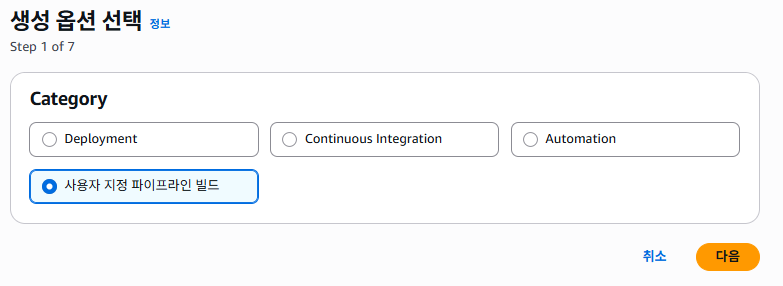
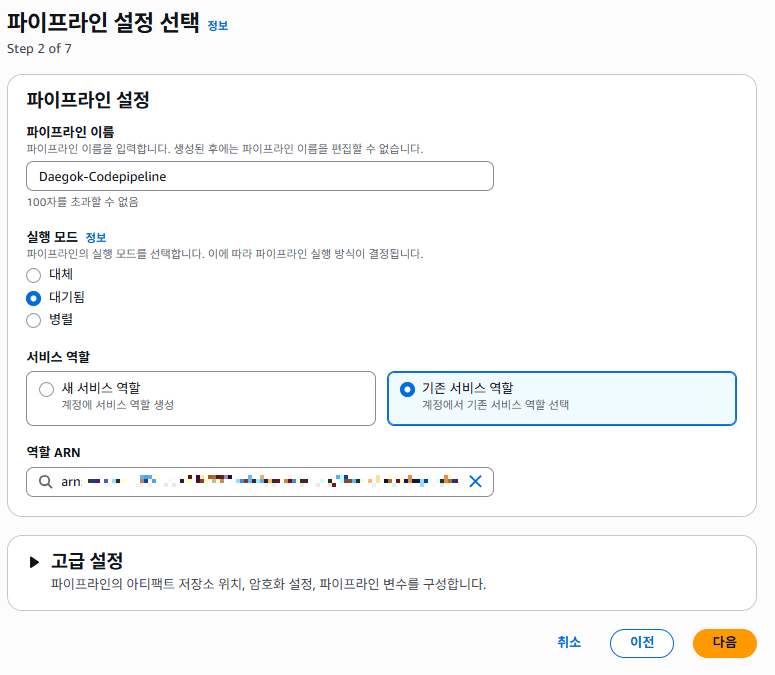
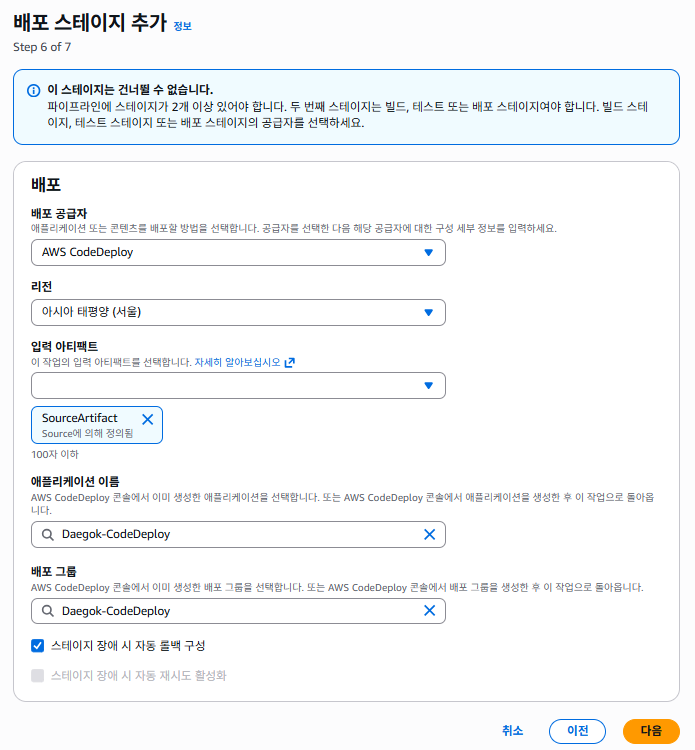
CodePipeline 생성
CodePipeline과 CodeDeploy가 S3 및 ECS 리소스에 접근하여 배포를 수행하도록 아래 IAM 권한 정책을 부여하였다.
AmazonS3FullAccess
AmazonS3ReadOnlyAccess
AWSCodeDeployRoleForECS
AWSCodePipelineServiceRole-ap-northeast-2-Daegok-Codepipeline
CodePipeline-CodeDeploy-ap-northeast-2-Daegok-Codepipeline
CodePipeline-S3Source-ap-northeast-2-Daegok-Codepipeline

Jenkins Pipeline Script
Jenkins 배포를 위한 파이프라인 스크립트이다.
소스 코드를 가져와 소스 컨테이너화 후 배포 아티팩트 준비, 배포를 위해 CodePipleine을 트리거하는 전 과정을 정의한다.
pipeline {
agent any
environment {
// --- AWS 계정 및 리전 정보 ---
AWS_REGION = '현재의 region'
AWS_ACCOUNT_ID = 'AWS 계정 ID'
// --- ECR 정보 ---
ECR_REPO_NAME = 'ECR 레포지토리 이름'
ECR_URI = "${AWS_ACCOUNT_ID}.dkr.ecr.${AWS_REGION}.amazonaws.com/${ECR_REPO_NAME}"
IMAGE_TAG = "ECR 레포지토리 이름:${BUILD_NUMBER}"
FULL_IMAGE_URI = "${ECR_URI}:${BUILD_NUMBER}"
// CD 아티팩트 및 ECS/CodeDeploy 정보 추가
ECS_CLUSTER_NAME = 'Cluster 이름'
TASK_FAMILY = 'Task Definition 이름'
CONTAINER_NAME = 'Container 이름'
TASK_DEF_FILE = 'task-definition.json'
// S3 버킷 설정
ARTIFACT_BUCKET = 'S3 Bucket 이름'
S3_PREFIX = 'zip이 담길 폴더'
ZIP_ARTIFACT_NAME = 'artifact.zip'
// CodePipeline 이름 설정
CODEPIPELINE_NAME = 'CodePipeline 이름'
}
stages {
stage('Checkout & Create Configs') {
steps {
script {
deleteDir()
// 소스 코드 클론
sh 'git clone -b main https://github.com/spring-projects/spring-petclinic.git .'
// 1. pom.xml 생성
sh '''
cat > pom.xml <<'EOF'
<?xml version="1.0" encoding="UTF-8"?>
<project xmlns="http://maven.apache.org/POM/4.0.0" xmlns:xsi="http://www.w3.org/2001/XMLSchema-instance" xsi:schemaLocation="http://maven.apache.org/POM/4.0.0 https://maven.apache.org/xsd/maven-4.0.0.xsd">
<modelVersion>4.0.0</modelVersion>
<parent>
<groupId>org.springframework.boot</groupId>
<artifactId>spring-boot-starter-parent</artifactId>
<version>4.0.0-M3</version>
<relativePath></relativePath>
</parent>
<groupId>org.springframework.samples</groupId>
<artifactId>spring-petclinic</artifactId>
<version>4.0.0-SNAPSHOT</version>
<name>petclinic</name>
<properties>
<java.version>21</java.version> <maven.compiler.release>21</maven.compiler.release>
<project.build.sourceEncoding>UTF-8</project.build.sourceEncoding>
<project.reporting.outputEncoding>UTF-8</project.reporting.outputEncoding>
<project.build.outputTimestamp>2024-11-28T14:37:52Z</project.build.outputTimestamp>
<webjars-locator.version>1.1.1</webjars-locator.version>
<webjars-bootstrap.version>5.3.8</webjars-bootstrap.version>
<webjars-font-awesome.version>4.7.0</webjars-font-awesome.version>
<checkstyle.version>11.1.0</checkstyle.version>
<error-prone.version>2.42.0</error-prone.version>
<jacoco.version>0.8.13</jacoco.version>
<libsass.version>0.3.4</libsass.version>
<lifecycle-mapping>1.0.0</lifecycle-mapping>
<maven-checkstyle.version>3.6.0</maven-checkstyle.version>
<nohttp-checkstyle.version>0.0.11</nohttp-checkstyle.version>
<nullaway.version>0.12.10</nullaway.version>
<spring-format.version>0.0.47</spring-format.version>
</properties>
<dependencies>
<dependency>
<groupId>org.springframework.boot</groupId>
<artifactId>spring-boot-starter-actuator</artifactId>
</dependency>
<dependency>
<groupId>org.springframework.boot</groupId>
<artifactId>spring-boot-starter-cache</artifactId>
</dependency>
<dependency>
<groupId>org.springframework.boot</groupId>
<artifactId>spring-boot-starter-data-jpa</artifactId>
</dependency>
<dependency>
<groupId>org.springframework.boot</groupId>
<artifactId>spring-boot-starter-web</artifactId>
</dependency>
<dependency>
<groupId>org.springframework.boot</groupId>
<artifactId>spring-boot-starter-validation</artifactId>
</dependency>
<dependency>
<groupId>io.micrometer</groupId>
<artifactId>micrometer-registry-prometheus</artifactId>
</dependency>
<dependency>
<groupId>org.springframework.boot</groupId>
<artifactId>spring-boot-starter-thymeleaf</artifactId>
</dependency>
<dependency>
<groupId>org.springframework.boot</groupId>
<artifactId>spring-boot-starter-test</artifactId>
<scope>test</scope>
</dependency>
<dependency>
<groupId>org.springframework.boot</groupId>
<artifactId>spring-boot-starter-restclient</artifactId>
<scope>test</scope>
</dependency>
<dependency>
<groupId>com.h2database</groupId>
<artifactId>h2</artifactId>
<scope>runtime</scope>
</dependency>
<dependency>
<groupId>com.mysql</groupId>
<artifactId>mysql-connector-j</artifactId>
<scope>runtime</scope>
</dependency>
<dependency>
<groupId>org.postgresql</groupId>
<artifactId>postgresql</artifactId>
<scope>runtime</scope>
</dependency>
<dependency>
<groupId>javax.cache</groupId>
<artifactId>cache-api</artifactId>
</dependency>
<dependency>
<groupId>com.github.ben-manes.caffeine</groupId>
<artifactId>caffeine</artifactId>
</dependency>
<dependency>
<groupId>org.webjars</groupId>
<artifactId>webjars-locator-lite</artifactId>
<version>${webjars-locator.version}</version>
</dependency>
<dependency>
<groupId>org.webjars.npm</groupId>
<artifactId>bootstrap</artifactId>
<version>${webjars-bootstrap.version}</version>
</dependency>
<dependency>
<groupId>org.webjars.npm</groupId>
<artifactId>font-awesome</artifactId>
<version>${webjars-font-awesome.version}</version>
</dependency>
<dependency>
<groupId>org.springframework.boot</groupId>
<artifactId>spring-boot-devtools</artifactId>
<scope>test</scope>
</dependency>
<dependency>
<groupId>org.springframework.boot</groupId>
<artifactId>spring-boot-testcontainers</artifactId>
<scope>test</scope>
</dependency>
<dependency>
<groupId>org.springframework.boot</groupId>
<artifactId>spring-boot-docker-compose</artifactId>
<scope>test</scope>
</dependency>
<dependency>
<groupId>org.testcontainers</groupId>
<artifactId>junit-jupiter</artifactId>
<scope>test</scope>
</dependency>
<dependency>
<groupId>org.testcontainers</groupId>
<artifactId>mysql</artifactId>
<scope>test</scope>
</dependency>
<dependency>
<groupId>jakarta.xml.bind</groupId>
<artifactId>jakarta.xml.bind-api</artifactId>
</dependency>
</dependencies>
<build>
<plugins>
<plugin>
<groupId>org.apache.maven.plugins</groupId>
<artifactId>maven-enforcer-plugin</artifactId>
<executions>
<execution>
<id>enforce-java</id>
<goals>
<goal>enforce</goal>
</goals>
<configuration>
<rules>
<requireJavaVersion>
<message>This build requires at least Java ${java.version}, update your JVM, and run the build again</message>
<version>${java.version}</version>
</requireJavaVersion>
</rules>
</configuration>
</execution>
</executions>
</plugin>
<plugin>
<groupId>io.spring.javaformat</groupId>
<artifactId>spring-javaformat-maven-plugin</artifactId>
<version>${spring-format.version}</version>
<executions>
<execution>
<goals>
<goal>validate</goal>
</goals>
<phase>validate</phase>
</execution>
</executions>
</plugin>
<plugin>
<groupId>org.apache.maven.plugins</groupId>
<artifactId>maven-checkstyle-plugin</artifactId>
<version>${maven-checkstyle.version}</version>
<dependencies>
<dependency>
<groupId>com.puppycrawl.tools</groupId>
<artifactId>checkstyle</artifactId>
<version>${checkstyle.version}</version>
</dependency>
<dependency>
<groupId>io.spring.nohttp</groupId>
<artifactId>nohttp-checkstyle</artifactId>
<version>${nohttp-checkstyle.version}</version>
</dependency>
</dependencies>
<executions>
<execution>
<id>nohttp-checkstyle-validation</id>
<goals>
<goal>check</goal>
</goals>
<phase>validate</phase>
<configuration>
<configLocation>src/checkstyle/nohttp-checkstyle.xml</configLocation>
<sourceDirectories>${basedir}</sourceDirectories>
<includes>**/*</includes>
<excludes>**/.git/**/*,**/.idea/**/*,**/target/**/,**/.flattened-pom.xml,**/*.class</excludes>
<propertyExpansion>config_loc=${basedir}/src/checkstyle/</propertyExpansion>
</configuration>
</execution>
</executions>
</plugin>
<plugin>
<groupId>org.graalvm.buildtools</groupId>
<artifactId>native-maven-plugin</artifactId>
</plugin>
<plugin>
<groupId>org.springframework.boot</groupId>
<artifactId>spring-boot-maven-plugin</artifactId>
<executions>
<execution>
<goals>
<goal>build-info</goal>
</goals>
<configuration>
<additionalProperties>
<encoding.source>${project.build.sourceEncoding}</encoding.source>
<encoding.reporting>${project.reporting.outputEncoding}</encoding.reporting>
<java.source>${java.version}</java.source>
<java.target>${java.version}</java.target>
</additionalProperties>
</configuration>
</execution>
</executions>
</plugin>
<plugin>
<groupId>org.jacoco</groupId>
<artifactId>jacoco-maven-plugin</artifactId>
<version>${jacoco.version}</version>
<executions>
<execution>
<goals>
<goal>prepare-agent</goal>
</goals>
</execution>
<execution>
<id>report</id>
<goals>
<goal>report</goal>
</goals>
<phase>prepare-package</phase>
</execution>
</executions>
</plugin>
<plugin>
<groupId>io.github.git-commit-id</groupId>
<artifactId>git-commit-id-maven-plugin</artifactId>
<configuration>
<failOnNoGitDirectory>false</failOnNoGitDirectory>
<failOnUnableToExtractRepoInfo>false</failOnUnableToExtractRepoInfo>
</configuration>
</plugin>
<plugin>
<groupId>org.apache.maven.plugins</groupId>
<artifactId>maven-compiler-plugin</artifactId>
<executions>
<execution>
<id>default-compile</id>
<phase>compile</phase>
<goals>
<goal>compile</goal>
</goals>
</execution>
</executions>
</plugin>
<plugin>
<?m2e ignore?>
<groupId>org.cyclonedx</groupId>
<artifactId>cyclonedx-maven-plugin</artifactId>
</plugin>
</plugins>
</build>
<licenses>
<license>
<name>Apache License, Version 2.0</name>
<url>https://www.apache.org/licenses/LICENSE-2.0</url>
</license>
</licenses>
<profiles>
<profile>
<id>css</id>
<build>
<plugins>
<plugin>
<groupId>org.apache.maven.plugins</groupId>
<artifactId>maven-dependency-plugin</artifactId>
<executions>
<execution>
<id>unpack</id>
<goals>
<goal>unpack</goal>
</goals>
<?m2e execute onConfiguration,onincremental?>
<phase>generate-resources</phase>
<configuration>
<artifactItems>
<artifactItem>
<groupId>org.webjars.npm</groupId>
<artifactId>bootstrap</artifactId>
<version>${webjars-bootstrap.version}</version>
</artifactItem>
</artifactItems>
<outputDirectory>${project.build.directory}/webjars</outputDirectory>
</configuration>
</execution>
</executions>
</plugin>
<plugin>
<groupId>com.gitlab.haynes</groupId>
<artifactId>libsass-maven-plugin</artifactId>
<version>${libsass.version}</version>
<configuration>
<inputPath>${basedir}/src/main/scss/</inputPath>
<outputPath>${basedir}/src/main/resources/static/resources/css/</outputPath>
<includePath>${project.build.directory}/webjars/META-INF/resources/webjars/bootstrap/${webjars-bootstrap.version}/scss/</includePath>
</configuration>
<executions>
<execution>
<?m2e execute onConfiguration,onincremental?>
<goals>
<goal>compile</goal>
</goals>
<phase>generate-resources</phase>
</execution>
</executions>
</plugin>
</plugins>
</build>
</profile>
<profile>
<id>m2e</id>
<activation>
<property>
<name>m2e.version</name>
</property>
</activation>
<build>
<pluginManagement>
<plugins>
<plugin>
<groupId>org.eclipse.m2e</groupId>
<artifactId>lifecycle-mapping</artifactId>
<version>${lifecycle-mapping}</version>
<configuration>
<lifecycleMappingMetadata>
<pluginExecutions>
<pluginExecution>
<pluginExecutionFilter>
<groupId>org.apache.maven.plugins</groupId>
<artifactId>maven-checkstyle-plugin</artifactId>
<versionRange>[1,)</versionRange>
<goals>
<goal>check</goal>
</goals>
</pluginExecutionFilter>
<action>
<ignore></ignore>
</action>
</pluginExecution>
<pluginExecution>
<pluginExecutionFilter>
<groupId>org.springframework.boot</groupId>
<artifactId>spring-boot-maven-plugin</artifactId>
<versionRange>[1,)</versionRange>
<goals>
<goal>build-info</goal>
</goals>
</pluginExecutionFilter>
<action>
<ignore></ignore>
</action>
</pluginExecution>
<pluginExecution>
<pluginExecutionFilter>
<groupId>io.spring.javaformat</groupId>
<artifactId>spring-javaformat-maven-plugin</artifactId>
<versionRange>[0,)</versionRange>
<goals>
<goal>validate</goal>
</goals>
</pluginExecutionFilter>
<action>
<ignore></ignore>
</action>
</pluginExecution>
</pluginExecutions>
</lifecycleMappingMetadata>
</configuration>
</plugin>
</plugins>
</pluginManagement>
</build>
</profile>
</profiles>
</project>
EOF
'''
sh '''
mkdir -p src/main/resources
cat > src/main/resources/application.properties <<'EOF'
management.endpoints.web.exposure.include=health,info,prometheus
EOF
'''
// 2. Dockerfile 생성
sh '''
cat > Dockerfile <<'EOF'
FROM maven:3.9.6-eclipse-temurin-21 AS builder
WORKDIR /app
COPY pom.xml .
RUN mvn dependency:go-offline
COPY . .
RUN mvn clean package -DskipTests -Dmaven.test.skip=true
FROM eclipse-temurin:21-jdk
WORKDIR /app
RUN apt-get update && apt-get install -y jq
COPY --from=builder /app/target/*.jar app.jar
EXPOSE 8080
ENTRYPOINT ["java", "-jar", "app.jar"]
EOF
'''
sh 'ls -l Dockerfile'
// 3. Task Definition 템플릿 파일 생성
sh """
cat > ${TASK_DEF_FILE} <<'EOF'
{
"family": "${TASK_FAMILY}",
"networkMode": "awsvpc",
"containerDefinitions": [
{
"cpu": 0,
"environment": [],
"environmentFiles": [],
"essential": true,
"image": "${FULL_IMAGE_URI}",
"logConfiguration": {
"logDriver": "awslogs",
"options": {
"awslogs-group": "/ecs/Task Definition 이름",
"awslogs-create-group": "true",
"awslogs-region": "${AWS_REGION}",
"awslogs-stream-prefix": "ecs"
},
"secretOptions": []
},
"mountPoints": [],
"name": "${CONTAINER_NAME}",
"portMappings": [
{
"appProtocol": "http",
"containerPort": 8080,
"hostPort": 8080,
"name": "포트 이름",
"protocol": "tcp"
}
],
"systemControls": [],
"ulimits": [],
"volumesFrom": []
}
],
"cpu": "1024",
"enableFaultInjection": false,
"executionRoleArn": "arn:aws:iam::${AWS_ACCOUNT_ID}:role/ecsTaskExecutionRole",
"memory": "3072",
"placementConstraints": [],
"requiresCompatibilities": [
"FARGATE"
],
"runtimePlatform": {
"cpuArchitecture": "X86_64",
"operatingSystemFamily": "LINUX"
},
"volumes": [],
"tags": []
}
EOF
"""
}
}
}
stage('Build Docker Image') {
steps {
script {
sh 'echo "Building Docker image"'
sh 'docker build --network=host -t $IMAGE_TAG -f Dockerfile .'
}
}
}
stage('Login to AWS ECR') {
steps {
script {
sh 'echo "Logging into AWS ECR"'
sh 'aws ecr get-login-password --region $AWS_REGION | docker login --username AWS --password-stdin $ECR_URI'
}
}
}
stage('Check OS') {
steps {
sh 'cat /etc/os-release'
}
}
stage('Tag and Push Image to ECR & Upload Artifacts') {
steps {
script {
sh 'echo "Tagging and pushing image to ECR"'
sh 'docker tag $IMAGE_TAG $FULL_IMAGE_URI'
sh 'docker push $FULL_IMAGE_URI'
sh 'echo "Image pushed successfully to ECR with URI: $FULL_IMAGE_URI"'
echo "--- Preparing CD Artifacts ---"
// 1. imageDetail.json 생성
sh """
echo '[{"name":"${CONTAINER_NAME}","imageUri":"${FULL_IMAGE_URI}"}]' > imageDetail.json
"""
// 1-2. imagedefinitions.json 추가 생성
sh """
echo '[{"name":"${CONTAINER_NAME}","imageUri":"${FULL_IMAGE_URI}"}]' > imagedefinitions.json
"""
// 2. Task Definition 파일 정리 (jq 사용)
sh """
echo "Cleaning up task-definition.json..."
cat ${TASK_DEF_FILE} | \\
jq 'del(.taskDefinitionArn) | del(.revision) | del(.status) | del(.registeredAt) | del(.registeredBy) | del(.requiresAttributes) | del(.compatibilities) | del(.tags) | del(.enableFaultInjection)' > ${TASK_DEF_FILE}_CLEAN
mv ${TASK_DEF_FILE}_CLEAN ${TASK_DEF_FILE}
"""
// 3. AppSpec YAML 파일 생성
def appSpecContent = """
version: 0.0
Resources:
- TargetService:
Type: AWS::ECS::Service
Properties:
TaskDefinition: "Task ARN"
LoadBalancerInfo:
ContainerName: "${CONTAINER_NAME}"
ContainerPort: 8080
PlatformVersion: "LATEST"
"""
writeFile file: 'appspec.yml', text: appSpecContent
// ZIP 압축 실행 (zip 사용)
echo "Zipping deployment artifacts into ${ZIP_ARTIFACT_NAME}"
sh "ls -al"
sh "zip ${ZIP_ARTIFACT_NAME} appspec.yml imageDetail.json imagedefinitions.json ${TASK_DEF_FILE}"
echo "--- Uploading Artifacts to S3 for CodePipeline ---"
// ZIP 파일 하나만 S3에 업로드
sh "aws s3 cp ${ZIP_ARTIFACT_NAME} s3://${ARTIFACT_BUCKET}/${S3_PREFIX}/${ZIP_ARTIFACT_NAME}"
echo " All CI artifacts are ready for CD."
// ----------------------------------------------------------------------------------
// 4. AWS CodePipeline 실행 요청 추가
// ----------------------------------------------------------------------------------
echo "--- Triggering AWS CodePipeline: ${CODEPIPELINE_NAME} ---"
sh "aws codepipeline start-pipeline-execution --name ${CODEPIPELINE_NAME}"
echo "CodePipeline ${CODEPIPELINE_NAME} execution started successfully."
// ----------------------------------------------------------------------------------
}
}
}
}
post {
success {
echo 'Docker Image Build 및 AWS ECR Push, CD 아티팩트 ZIP 파일 S3 업로드, CodePipeline 실행 요청이 성공적으로 완료되었습니다.'
echo " S3 아티팩트 경로: s3://${env.ARTIFACT_BUCKET}/${env.S3_PREFIX}/${env.ZIP_ARTIFACT_NAME}"
echo " CodePipeline 이름: ${env.CODEPIPELINE_NAME}"
}
failure {
echo '오류 발생. 빌드, ECR 푸시, S3 업로드, 또는 CodePipeline 요청 단계에서 문제가 발생했습니다. 로그를 확인하세요.'
}
}
}
해당 스크립트를 기반으로 빌드를 진행한다.
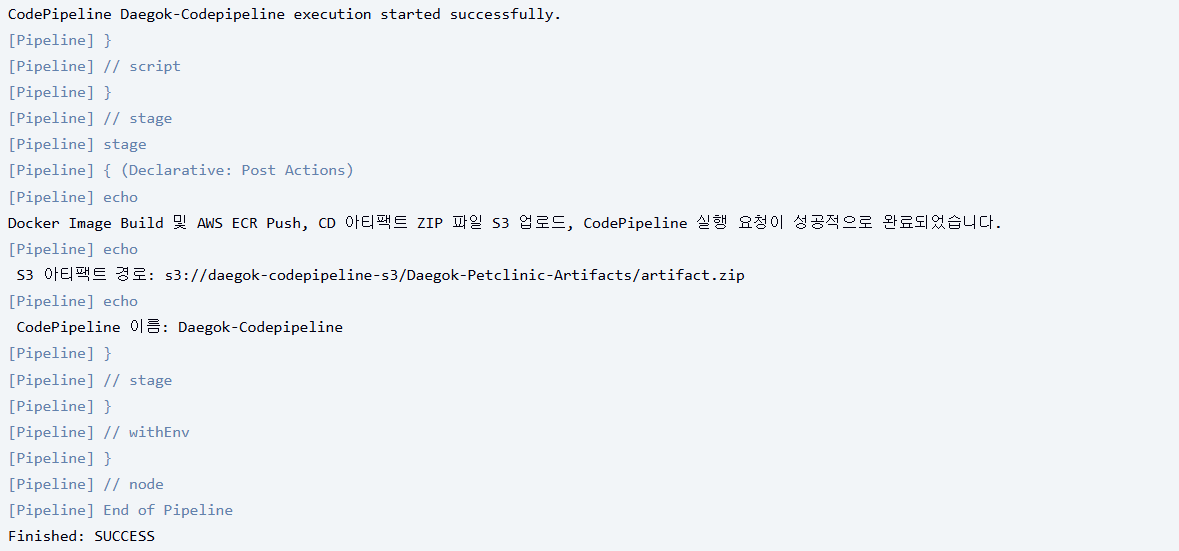
ECS 콘솔에서 CodePipeline이 제대로 트리거 되었음을 확인 가능하다.

최종 배포

